English




























































































































































































Google Phone App Gets a Fresh Redesign: What’s New in the Dialer?

Google Phone dialer update 2025 Google has officially started rolling out a major redesign of its Phone app, the default dialer for many Android devices. This update isn’t just a minor tweak—it’s one of the biggest visual and functional changes the app has seen in years. Here’s everything you need to know about the new Google Phone dialer.
A Modern Look with Material 3 Expressive Design
The biggest change comes in the form of Google’s Material 3 Expressive design language. The dialer now feels more modern, bold, and colorful.
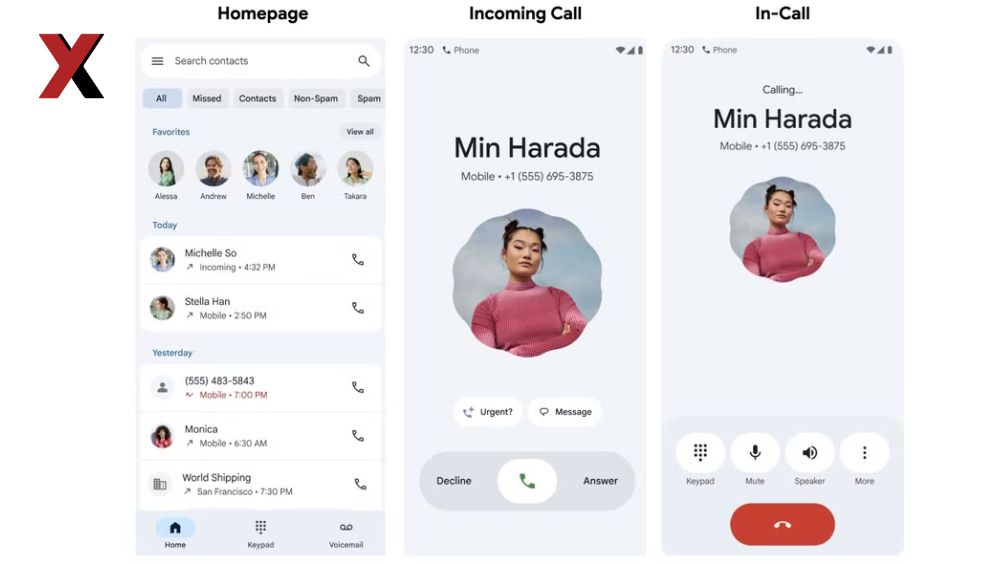
- Bigger contact names and photos: Caller details now appear larger, making it easier to recognize who’s calling.
- Pill-shaped buttons: The traditional circular call controls have been replaced with pill-like buttons that expand when pressed, giving the app a more fluid and dynamic feel.
- Rounded cards and layouts: Recent calls are displayed inside neat rounded cards, while the keypad background also has soft rounded edges.
Simplified Navigation
Google has also restructured the app’s layout to make it easier to use:
- The bottom menu now shows only two tabs — “Recents” and “Contacts.”
- Favorites are no longer in a separate tab. Instead, pinned contacts now appear in a horizontal row at the top of the Recents screen.
- Call history can be filtered into categories such as All, Missed, Contacts, Non-Spam, and Spam for better organization.
New Ways to Answer Calls
One of the most noticeable changes is how you answer incoming calls. Until now, users had to swipe up or down, which often led to accidental actions. The new update gives you more flexibility:
- Swipe right to answer, left to decline.
- Single tap buttons for Answer or Decline, similar to how iPhones handle calls.
- A new setting lets you choose your preferred method under “Incoming call gesture.”
This small change makes the experience much smoother and safer, especially when answering calls quickly.
In-Call Experience Gets Smarter
The redesign isn’t just about looks—Google has also improved the in-call interface:
- Animated caller photos: Incoming calls now display contact pictures with fun animated effects.
- Bigger call controls: Buttons like “End Call” or “Mute” are now larger and easier to access.
- Smoother performance: The app feels faster and more responsive while switching between calls or opening the keypad.
Rollout and Availability
The redesign is currently being rolled out gradually, starting with beta versions of the Google Phone app. If you’re on the stable version, you may receive it in the coming weeks as the update expands to more devices worldwide.
Why This Update Matters
The Phone app is one of the most frequently used apps on any smartphone, and this update shows Google’s focus on making everyday interactions simpler, safer, and more visually appealing. With cleaner navigation, larger touch controls, and customizable call gestures, the new Google Phone dialer is designed to give users a more intuitive calling experience.